
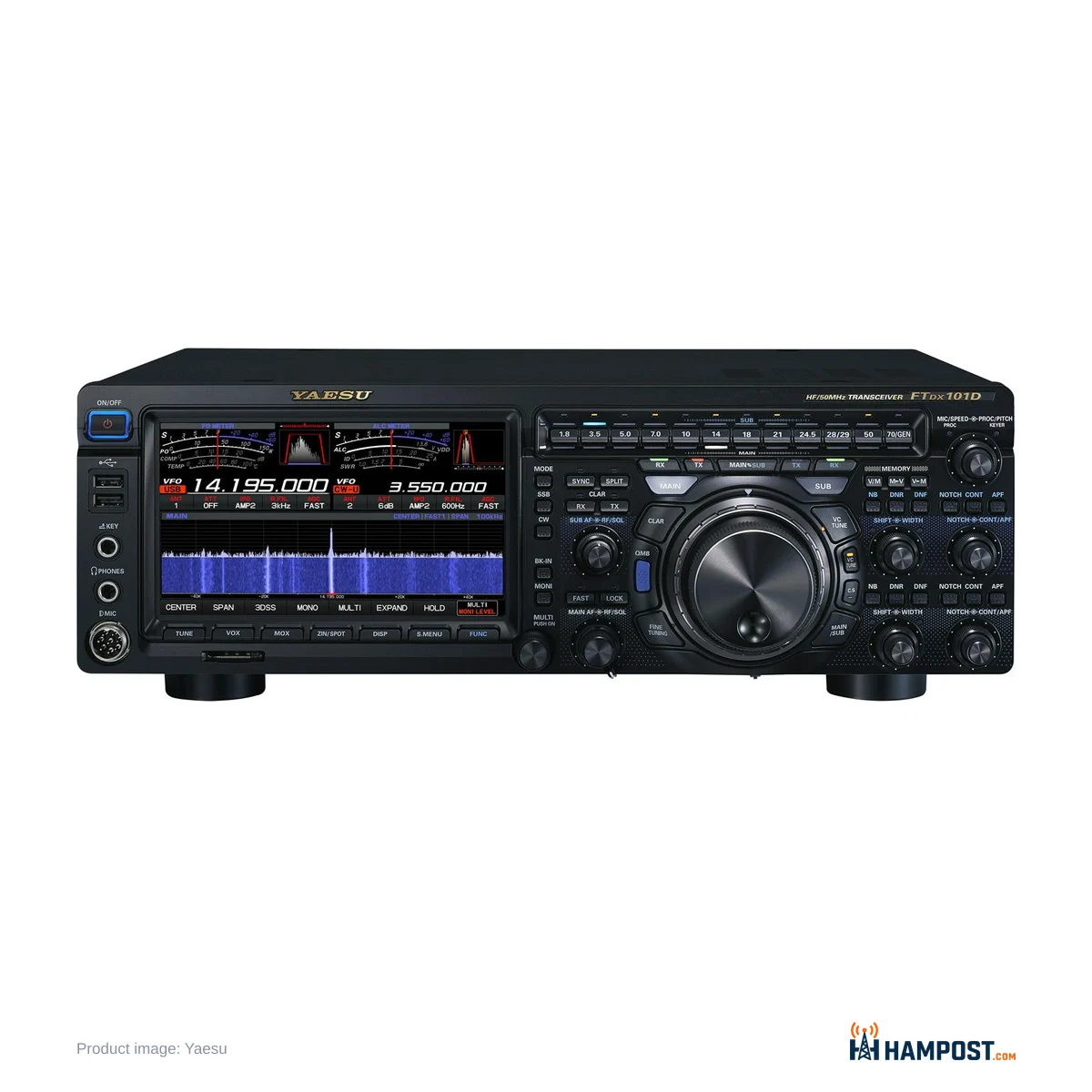
Two receivers, three antenna jacks and a band key for every band. The FTDX101D is built around one idea: hear the weak station while the strong one sits right next to it, and do it on two bands at once. Everything about living with it follows from that, including the desk space it takes and the money it costs.
The receiver is the reason to buy it. In the ARRL Lab it measured 110 dB of third-order dynamic range at 2 kHz spacing, and on a crowded contest weekend that number turns into quiet, clean audio with a pileup a kilohertz away. The noise reduction and VC-Tune preselector make noisy suburban bands bearable in a way few radios manage.
The price of entry is real: a street price around $3,750 with the current Yaesu coupon, a scope with no averaging, pop-up windows that vanish before you finish, and a reliability record that is good rather than spotless. My view: for a serious DXer or contester it is still one of the best 100 W radios you can put on the desk.
What the 101D adds over the FTDX10
If you have read the Yaesu FTDX10 review, the receiver story will sound familiar. Both use a narrow-band SDR with a 9 MHz first IF and crystal roofing filters, plus a separate direct-sampling SDR for the scope. Close-in, on CW, the two sound very alike. The 101D earns its extra cost elsewhere.
- A second, identical receiver. MAIN runs at 9.005 MHz and SUB at 8.900 MHz, each with its own roofing filters, DSP and scope.
- VC-Tune. A stepper-motor tuned preselector on the MAIN receiver, with the VCT-101 unit available for SUB.
- Three antenna ports. ANT 3 defaults to receive-only, so a Beverage or a small loop plugs straight in.
- RX OUT and IF OUT jacks for an external SDR panadapter.
- A full front panel. Every band has its own key, LEDs show which receiver sits on which band, and MAIN and SUB controls are duplicated and colour coded.
That last point matters more than it looks. Band changes on the FTDX10 take a button and a screen tap. On the 101D they take one press, and you can see where both receivers are at a glance.
A receiver for crowded bands
Put the 101D on 20 m during a big contest and it does not fold. Strong stations stay where they are, and you can work in the gap between two runners with the width, shift and contour controls. The ARRL Lab measured 125 dB reciprocal mixing dynamic range at 2 kHz and saw no blocking with up to +10 dBm at the antenna jack. In practice, the receiver is not the limit in your station.
The receive audio is easy to listen to for hours. It is tight and quiet, without the hiss some SDRs have, and I would run headphones or a good external speaker to get the most from it.
A fair caveat: the real-world gap to the other top radios is small. Next to an IC-7610 or a TS-890S on the same antenna, plenty of experienced operators cannot pick a winner on normal evenings. If you are still weighing the field, my HF transceiver buying guide for the home station sets out the whole range. The lab margin shows up mostly in the hardest conditions, with very strong signals close in. Buy the 101D for that, not because the chart says it is number one.
Noise reduction and VC-Tune
This is where the 101D pulls away from most competitors in a noisy suburb. DNR has 15 algorithm steps rather than a simple level, and on SSB it lifts a voice out of hash. Since the 2023 firmware updates it runs at higher settings with far fewer watery artifacts, and the noise blanker improved at the same time. On an older unit, update first and judge it after.
VC-Tune is the other tool. It is a motor-driven capacitor preselector that you slide with the outer ring of the main dial. Detune it slightly and broadband noise and a strong neighbour drop away faster than the signal you want. I would use VC-Tune before reaching for the RF gain or the attenuator on the low bands.
Not everyone loves the DNR. A minority find it coloured on voice, and very aggressive settings still sound processed. Keep it at the lowest step that does the job.
Two receivers and a receive antenna
The dual receiver earns its place every day, and working split DX pileups is only part of it. Park SUB on 6 m or 10 m on its own antenna and watch for an opening while you operate MAIN on 17 m. Each receiver can sit on a different band, mode and antenna, with its own scope on screen.
The receive antenna input is the feature I would miss most. Assign ANT 3 to a quiet loop or Beverage, listen on it and transmit on the main antenna, and the local noise that swamps a dipole drops away while the signals stay readable. Antenna selection is stored per band. If you use an active receive antenna, keep ANT 3 set to Receive Only so you never transmit into it.
The rear RX OUT (MAIN) and IF OUT jacks let you add an outboard SDR for a high-resolution panadapter. The IF output is taken before the roofing filter, so the outboard receiver sees more than the passband you are listening to.
The scope, the screen and the menus
The 7-inch touchscreen is bright and fast, and the scope is truly real time. That is also its weakness. There is no averaging, so out of the box it jitters. Set LEVEL so the band noise just starts to colour the waterfall, choose a colour scheme you like, and leave it. Many operators also turn 3DSS off for good and use the 2D waterfall. A few love 3DSS, so try both.
The best fix is the rear DVI-D output and a mouse in a front USB port. A larger monitor with click-to-tune makes the scope far more useful, and most on-screen functions work with the mouse. The radio needs a monitor that accepts 800 x 480 or 800 x 600, and you set EXT DISPLAY to ON in the menu.
The menus are grouped in plain English and are fine once learned. The manual is thin, so expect to learn by doing. My two real gripes are the pop-ups for meters, width and power, which close after a second or two, and the lack of a dedicated RF power knob. I would put power on the MULTI knob or the outer ring with the C.S key and leave it there.
The outer ring around the main dial handles clarifier, VC-Tune and other functions. It is easy to brush the main dial while turning it, so I would lock the VFO when running a frequency.
Transmit audio takes setup
Out of the box, SSB audio can sound woolly or overdriven. The fix is in the menus: set the TX bandpass, then the three-band parametric EQ, then mic gain, AMC and the processor while watching ALC and listening on a second receiver. Once it is set, the 101D sounds clean and punchy on the air.
On CW, the keying is clean and the ARRL Lab measured very low transmitted phase noise. Full QSK uses relays, and the clatter gets old. I would run semi break-in with a short delay instead.
What goes wrong, and what lasts
Most FTDX101Ds run for years without trouble. Some early units had an RF power overshoot on key-down, which matters with a solid-state amplifier. Yaesu fixed it with a hardware change, so on a used radio ask whether that work was done.
A minority of radios have needed factory repair: lockups at power-on asking for a firmware SD card, dead rear USB ports, transmit faults, and a few repeat trips for the same problem. Yaesu backs the radio with a three-year warranty, and I would lean on it. Test everything in the first weeks. The cooling fan can also whine as it starts, which some find annoying in a quiet shack.
Firmware has improved the radio, but slowly. Scope averaging is still missing after years of requests, so do not buy it expecting that to change.
How it compares
RadioWhy you'd pick it Yaesu FTDX101DTwo identical receivers, VC-Tune, receive antenna port, top close-in performance Yaesu FTDX10Nearly the same single receiver for far less money and desk space Yaesu FTDX101MPSame radio with 200 W, the external power supply speaker and more filters fitted Icom IC-7610Dual-receiver SDR with a smoother scope and friendlier controls Kenwood TS-890SExcellent single receiver, cleaner display, no second receiverHow I would set one up
- Order the optional roofing filters and the SUB VC-Tune unit with the radio. Yaesu installs them.
- Update to the latest firmware from an SD card, then save menus and memories to the card.
- Connect a receive antenna to ANT 3, left on Receive Only, and assign it per band.
- Set the scope LEVEL so noise just colours the waterfall. Use 2D if 3DSS does not suit you.
- Add a DVI-D monitor and a USB mouse.
- Put RF power on the MULTI knob or the outer ring.
- Set TX bandpass, EQ, mic gain and AMC while monitoring on a second receiver.
- Run semi break-in on CW rather than full QSK.
Who should buy it
- Contesters and DXers who live in crowded bands and want two receivers in one box. If you are new to it, start with your first contest weekend.
- Operators in noisy suburbs who will use DNR, VC-Tune and a receive antenna.
- Low-band operators who want a dedicated receive antenna input.
- Anyone stepping up from an FTDX5000 or FTDX3000 who likes knobs and buttons.
Skip it if you want a clean scope out of the box, simple menus, or a radio you can learn in an afternoon. If you never use the second receiver or a receive antenna, the FTDX10 gives you most of the performance for far less.
Bottom line
The FTDX101D still has one of the best receivers in amateur radio, and its second receiver, VC-Tune and receive antenna port make it a complete DX and contest station. It asks for patience with the scope, menus and transmit setup, and early testing under warranty, but the receiver repays it.
Reader field notes — share yours
Log in to share your field notes and photos.